Vintage Writing Watercolor Templates: Elevate Your Epistolary Designs
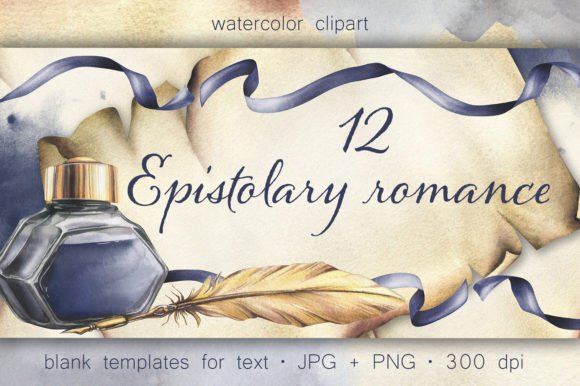
In an age of instant digital messages, the tangible art of letter writing carries a profound sense of elegance and nostalgia. For designers, stationery creators, and entrepreneurs, tapping into this sentiment requires more than just a standard font. This is where high-quality Vintage Writing Watercolor Templates become an invaluable asset. This collection, featuring hand-painted illustrations of ink, feathers, papyrus, and delicate hydrangea flowers, is designed to bring a unique, artistic touch to your projects, from book covers to personal stationery.
However, working with digital art packs, especially those with a specific aesthetic like watercolor, comes with its own set of challenges. A beautiful collection can lead to underwhelming results if used without care. Understanding the common pitfalls is the first step to creating designs that truly resonate. Let's explore how to use this collection effectively and avoid the mistakes that can diminish the final product.
Understanding the Core of the Collection
Before diving into design, it’s crucial to understand exactly what you have. This collection is not just a random assortment of images. It is a curated set of vintage writing illustrations digitized from original watercolor paintings. The ZIP archive provides you with 12 templates in both JPG and PNG formats. The key advantage here is that all PNG files come with a transparent background. This feature is a significant time-saver and offers immense creative flexibility, allowing you to layer elements seamlessly over different backgrounds without the hassle of manual cropping or masking.
Remember, this set is part of a larger ecosystem. It includes isolated elements, pre-made compositions, borders, and patterns. Thinking of these templates as foundational pieces, rather than finished products, is the first mindset shift toward better design.
The Transparency Misstep
A frequent oversight is using the JPG versions of the templates when the project calls for layering. While JPGs are excellent for direct use as backgrounds or letter sheets, they have a solid, typically white, background. If you try to place a JPG template over a colored or textured surface, the white box will show through, breaking the illusion of depth.
The Better Approach: Always default to the PNG files with transparent backgrounds for any composition work. For instance, if you are designing a book cover, use a textured paper JPG as your base, then layer the PNG elements—like the feather and inkwell—on top. This allows the texture to show through, creating a more integrated and professional look.
Overlooking the Power of Composition
Another common mistake is treating the templates as static, all-or-nothing pieces. Simply placing an entire template onto a notepad design can feel rigid and lack originality. The true value of this collection lies in its flexibility.
A Practical Solution: Deconstruct the templates. Isolate the hydrangea flowers and use them as corner decorations for an envelope. Take the feather element and use it as a standalone watermark on a diary page. By breaking down the pre-made compositions, you can create a cohesive suite of stationery prints where individual elements repeat, strengthening your brand identity for a poetry club or bookstore.
Resolution and Scaling
Digital watercolors have a unique texture that can suffer if scaled improperly. A common error is enlarging a small-resolution image for a large print project, resulting in a blurry, pixelated finish that loses the hand-painted charm. Conversely, using a high-resolution file for a tiny web graphic can slow down page load times.
Best Practices: For print projects like book covers or diaries, ensure your final output resolution is at least 300 DPI. Test scale a small section of the template at 100% in your design software before committing to a full layout. For digital use, such as social media graphics or blog headers, optimize the final file size without sacrificing the visible quality of the brushstrokes.
Font Pairing and Integration
The collection's preview images use specific fonts to evoke a vintage feel, but it's important to note that fonts are not included. A design can be made or broken by its typography. Choosing a modern, sans-serif font like Arial for a vintage watercolor letter sheet would create a jarring disconnect.
How to Correct This: Seek out serif or script fonts that complement the epistolary genre. Fonts that mimic calligraphy, old typewriter text, or elegant serifs work beautifully. The goal is harmony. The font should feel like a natural part of the vintage narrative, not an afterthought.
Checking Before You Commit
Before finalizing any design, run through a quick checklist to ensure quality and cohesion.
- Color Harmony: Does the color palette of your text and any additional graphic elements align with the soft, earthy tones of the watercolor hydrangeas and papyrus?
- Element Balance: Is the layout cluttered? Vintage designs thrive on elegance and whitespace. Ensure the illustrations enhance the content, not overwhelm it.
- File Format: Are you using the correct file type for your specific need (PNG for layering, JPG for direct backgrounds)?
- Scalability: Have you tested the template at the intended size for your final product, whether it's a small sticker or a large poster?
By approaching these Vintage Writing Watercolor Templates