Butterfly Rhinestone Templates: Instantly Elevate Your Craft Projects
There is a specific kind of frustration that hits when you are trying to cut intricate designs by hand, only to have the material snag or tear. For makers and designers working with heat transfer vinyl, rhinestones, or even heavy cardstock, precision is not just a luxury; it is a requirement. This is where high-quality digital assets stop being a convenience and start becoming a necessity. If you are looking to add a touch of sparkle or intricate detail to your merchandise, the Butterfly Rhinestone Templates offer a streamlined solution that bridges the gap between a creative idea and a professional finished product.
Understanding the Instant Download Package
When we talk about modern crafting efficiency, we are really talking about file compatibility and resolution. This particular design is marketed as an "Instant Download," which immediately removes the waiting time for shipping and allows you to start working the moment inspiration strikes. However, the true value lies in the technical specifications provided within the ZIP folder.
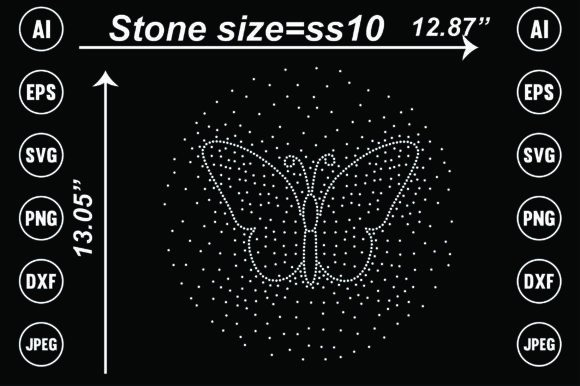
You are not just getting a single image file that you have to trace or convert. The package includes vector formats like Ai (Adobe Illustrator) and EPS, alongside SVG and DXF files. For those using cutting machines like Cricut or Silhouette, these vector formats are essential because they allow for infinite scaling without pixelation. You can enlarge the butterfly design for a back-of-the-shirt graphic or shrink it down for a pocket logo, and the lines will remain crisp.
Additionally, the inclusion of Transparent PNG and JPEG files at 300dpi ensures that the template is ready for sublimation printing or direct-to-garment (DTG) processes. The transparency of the PNG is particularly vital here; it means the butterfly design can be placed over other textures or colors without a white box surrounding it, maintaining a seamless integration with your base material.
Practical Applications for Makers and Professionals
The versatility of these Butterfly Rhinestone Templates extends far beyond just making a sparkly t-shirt, although that is certainly a popular application. Let’s look at how this asset functions across different environments.
Apparel and Fashion
In the world of custom apparel, butterflies are an evergreen motif. They symbolize transformation and freedom, making them a favorite for women’s fashion, children’s wear, and even festival gear. With the editable nature of these files, you can adjust the density of the rhinestone pattern. Perhaps you want a solid fill for a bold statement, or maybe you prefer an outline for a more delicate, feminine look. The ability to manipulate the vector nodes means you can tailor the design to fit specific garment cuts, such as curving the wings to match the neckline of a V-neck shirt.
Home Décor and Accessories
Think beyond fabric. These templates are perfectly suited for hard-surface customization. Imagine a set of ceramic mugs featuring a rhinestone butterfly for a bridal shower gift, or perhaps a canvas tote bag for a local market. Because the files are high-resolution, they translate well to sublimation on cushions or throw pillows. The symmetry of a butterfly design also lends itself well to centerpieces, making it easier to align the template when working on symmetrical items like the back of a denim jacket or a pair of sneakers.
Commercial and Educational Use
For small business owners, efficiency equals profit. Having a pre-made, high-quality template drastically reduces production time. Instead of spending hours designing a butterfly shape from scratch, you can download, resize, and send the file to your cutter in minutes. This is particularly useful for print-on-demand businesses that need to react quickly to trends. In educational settings, such as a high school art class or a vocational training program, these templates serve as excellent teaching tools for demonstrating how vector paths translate into physical cuts or prints.
Maximizing the "Editable" Feature
One of the strongest selling points of this package is that it is an editable file. This is a distinction that separates professional assets from clip art. When a file is editable, you own the flexibility to customize.
For instance, if you are creating a logo for a dance studio, you might want to alter the wing shape slightly to match the studio's specific branding aesthetic. With the SVG or AI file, you can ungroup the elements, modify anchor points, and even change the internal pattern of the rhinestone template. You could theoretically turn the rhinestone dots into a floral pattern or a geometric grid simply by swapping out the shape within the design software.
This level of customization ensures that your final product doesn't look generic. It allows you to take a standard template and make it proprietary to your brand, which is a significant competitive advantage in the crowded custom goods market.
Technical Considerations for Best Results
While the files are ready to go, getting a professional result depends on how you implement them. Here are a few practical considerations to keep in mind when working with these templates:
- Material Selection: The "rhinestone" aspect of the design implies a specific texture. If you are using heat transfer vinyl (HTV) rather than actual rhinestones, ensure your material is high-quality. Cheap vinyl can shrink when heat is applied, distorting the intricate butterfly details.
- Weeding Complexity: Butterfly designs often have detailed internal cuts (the wing patterns). If you are cutting this out of vinyl, ensure your blade is sharp. A dull blade will drag through the curves, ruining the delicate antennae or wing edges.
- File Conversion: While the package includes DXF and SVG, always double-check your machine's software compatibility. For example, Cricut Design Space works best with SVG, while some older Silhouette machines prefer DXF. Importing the wrong file type can sometimes lead to scaling issues.
- Layering: If you plan to use multiple colors, you may need to separate the layers in your design software before sending the job to the cutter. Ensure your registration marks are accurate so the layers align perfectly during the heat press stage.
The Value of High-Resolution Assets
It is worth emphasizing the 300dpi specification. In the world of digital printing, resolution is king. If you were to use a low-resolution web image (typically 72dpi) and try to print it on a large cushion, the result would be blurry and unprofessional. By providing 300dpi files, this package ensures that whether you are printing a small label or a large poster, the edges of the butterfly remain sharp and the dots in the rhinestone pattern remain distinct.
This attention to technical quality is what allows creators to charge a premium for their goods. When a customer receives a shirt with a crisp, vibrant, and perfectly aligned butterfly design, they perceive it as high-value merchandise, not just a homemade craft.
Final Thoughts on Workflow Integration
For the freelancer or the hobbyist, time is the most valuable resource. Integrating ready-to-use assets like these Butterfly Rhinestone Templates into your workflow is a strategic move. It minimizes the "setup" phase of a project and maximizes the "creation" phase.
Whether you are a seasoned graphic designer looking for a quick asset to modify for a client, or a parent planning a themed birthday party, the utility of a well-packaged digital download cannot be overstated. It provides the foundation upon which you can build something unique, ensuring that your final project—be it a t-shirt, a mug, or a digital display—looks polished and professionally executed. By leveraging the editable vectors and high-resolution rasters provided, you are equipped to handle a wide variety of projects with confidence and creative freedom.