Transform Your Next Pitch: The Ultimate Guide to Choosing and Using Unique Presentation Templates
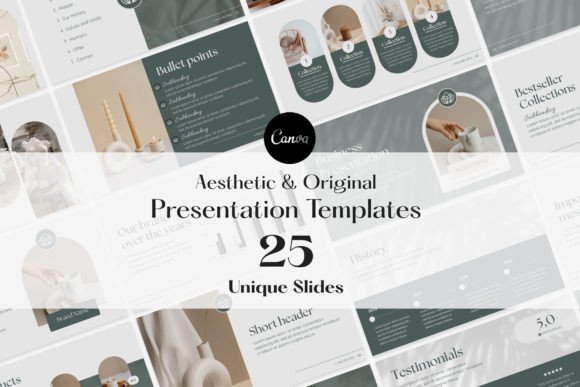
We have all been there—staring at a blank slide deck at 10 PM, desperately trying to align text boxes and find a color palette that doesn't look like it was designed in 1995. The struggle to create a professional business presentation is real, and it often leads to wasted hours and mediocre results. That is exactly why Unique Presentation Templates have become an essential tool for modern professionals. With a curated collection of 25 customizable slides designed specifically for business presentations, marketing kits, and product catalogs, these templates promise to elevate your storytelling without the headache.
However, simply downloading a set of slides does not guarantee a successful presentation. The difference between a pitch that secures funding and one that loses the room often lies in how you approach the tool, not just the tool itself. If you want to truly elevate your presentations, you need to avoid common pitfalls that plague even experienced marketers and entrepreneurs.
The Trap of "Set It and Forget It" Design
One of the most frequent misunderstandings regarding Unique Presentation Templates is the belief that they are a finished product. Many users download a deck, type in their information, and present it as is. This is a mistake. While the templates offer visually stunning graphics and a professional foundation, they are generic by nature. They are designed to be a starting point, not the final destination.
When you fail to tailor the template to your specific brand identity, you risk looking lazy or disconnected from your company’s values. For example, a template might come with a sleek, corporate blue theme. If your brand is vibrant, energetic, and uses neon oranges and purples, presenting that blue deck creates a subconscious disconnect for your audience. The user-friendly customization features are there for a reason. You must take the time to swap out the default color palettes for your brand hex codes and replace placeholder images with high-quality photos of your actual team or product. The goal is to make the template invisible, so the audience only sees you.
Overloading Slides: Ignoring the "White Space"
Another critical error is viewing the ample space on these slides as an invitation to cram in as much data as possible. A common misconception is that more text equals more value. In reality, cluttered slides are the fastest way to lose an audience's attention.
When utilizing Unique Presentation Templates for a business report or investor pitch, respect the design layout. The creators of these templates have utilized Full HD resolution 16:9 aspect ratios and intentional placement of text boxes to guide the viewer's eye. If you ignore the margins and fill every inch of white space with bullet points, you destroy the visual hierarchy.
The Better Approach: Treat your slides as a billboard, not a document. If you are presenting a complex marketing strategy, use the slide to highlight the key takeaway in a large, bold font. Put the detailed data in a "leave-behind" PDF or a separate handout. Use the dynamic visual elements provided in the template to represent data graphically rather than statistically. Remember, the audience is there to listen to you, not read a book off the screen.
The Canva Compatibility Myth
There is often a technical hurdle that frustrates users: software compatibility. Some users attempt to force these web-optimized designs into PowerPoint, leading to broken layouts and missing fonts. Conversely, others might not realize the full potential of the platform they are using.
These specific Unique Presentation Templates offer flexible customisation with the free version of Canva. This is a massive advantage for freelancers, educators, and small business owners who may not want to pay for expensive software licenses like Adobe Illustrator or Microsoft Office. However, a mistake users make is not utilizing the collaborative features of Canva. Because it is cloud-based, you can share the link with your team members to edit slides in real-time. If you are working on a marketing kit with a remote team, failing to use this collaborative aspect creates version control nightmares. Always ensure you are working within the native environment (Canva) for the best results, rather than fighting with file conversions.
Visuals That Distract Rather Than Engage
The promise of eye-catching charts and impactful images is a major draw, but it can be a double-edged sword. A frequent mistake in presentation design is prioritizing "cool" graphics over "clear" communication. Just because a template includes a complex animation or a busy background doesn't mean you have to use it.
Consider the context of your presentation. If you are creating a product catalog, high-resolution images are paramount. However, if you are presenting a quarterly financial report, overly artistic graphics can make the data feel unserious.
Practical Advice: Before you start editing, define the goal of each slide. Ask yourself: Does this graphic support my narrative or distract from it? If a template slide feels too busy for your specific content, delete the decorative elements. It is better to have a clean, slightly empty slide than a cluttered, confusing one. The templates provide the assets, but you are the curator. Select only the visual elements that enhance the storytelling, ensuring your communication remains professional and seamless.
Structuring Your Narrative for Impact
Finally, many users make the mistake of arranging their slides chronologically rather than logically. They start with the history of the company, move to the team, and finally, at slide 20, reveal the product. By then, the audience has checked their email.
With Unique Presentation Templates, you have the flexibility to rearrange the 25 editable slides to suit your flow. If you are pitching to investors, lead with the problem and your solution immediately. Use the visually stunning graphics early to hook their interest. If you are creating a marketing strategy, start with the "Big Win" goal, then work backward to the tactics.
Think of the template as a deck of cards. You can shuffle them to tell the best story. Don't feel bound by the order in which they were downloaded. By consciously structuring your narrative, you move from simply "giving a presentation" to delivering a persuasive experience.
Conclusion: Efficiency Meets Strategy
Utilizing Unique Presentation Templates is one of the smartest efficiency hacks for any creator or entrepreneur. They allow you to skip the hassle of starting from scratch and focus on what matters: your message. However, the tool is only as good as the hands wielding it. By avoiding the pitfalls of generic customization, visual clutter, and poor narrative structure, you can transform a standard slide deck into a powerful communication tool. Remember to tailor every element to your brand, respect the white space, and let the high-quality graphics serve your story, not overshadow it.