Understanding Text-Ready Design Templates: A Practical Guide for Creators
In the landscape of digital crafting and personal stationery, the decision between creating a design from scratch and utilizing a pre-made foundation is a common crossroads. For those evaluating their options, Text-Ready Design Templates offer a specific middle ground. These resources are designed to provide a visual framework—complete with graphics, layouts, and styling—while leaving the typography entirely up to the user. This approach caters to individuals who have a specific vision for their text or possess their own font libraries but lack the time or graphic design skills to build complex layouts from the ground up.
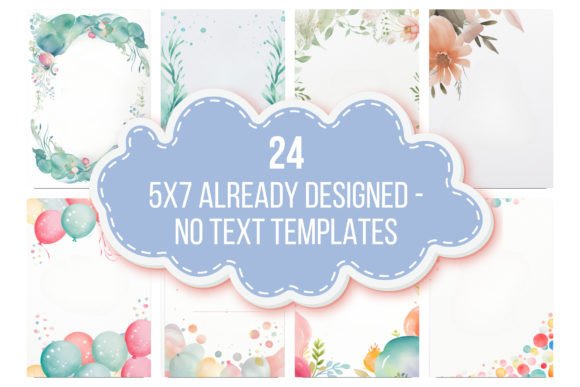
The core concept of Text-Ready Design Templates is the separation of visual artistry from typographic content. When you acquire a set of these templates, such as the collection featuring 24 diverse designs in 5x7 inch formats (2500 x 3500px at 300 dpi), you are purchasing the "background" and the compositional structure. The files are typically provided in versatile formats like JPG, PNG, SVG, or PDF, ensuring compatibility with a wide range of editing software. This distinct approach differs significantly from fully editable Canva templates or all-inclusive printable kits. By omitting fonts, these templates often avoid licensing restrictions that come with redistributing typefaces, giving users complete freedom to match the design to their existing brand or personal style without additional cost.
Evaluating the Tradeoffs: Flexibility vs. Convenience
When comparing Text-Ready Design Templates to other digital resources, it is essential to weigh the tradeoffs between flexibility and convenience. A major strength of this format is the control it offers over the final aesthetic. For a scrapbooker or a small business owner creating invitations, typography is a critical component of the design. Using a template that forces a specific font can sometimes clash with the intended mood. With Text-Ready options, the user is not constrained by the designer's typographic choices. This makes them an excellent resource for those who already have a curated collection of fonts or for projects that require specific branding guidelines to be met.
However, this flexibility comes with a requirement for user effort. Unlike a "drag-and-drop" solution where every element is pre-placed, Text-Ready Design Templates require the user to have access to a design editing program and a basic understanding of how to layer text onto an image. The requirement to use a computer for downloading and editing is a standard tradeoff for higher-resolution assets. For a user who is comparing this to a mobile-only app, the need for desktop software might seem like a hurdle. Yet, for the professional or serious hobbyist, the ability to work with 300 dpi files ensures that the final printed product—whether it is a journal cover or a greeting card—maintains crisp, professional quality.
Best-Fit Scenarios: Who Benefits Most?
Determining whether Text-Ready Design Templates are the right choice depends largely on the user's specific workflow and project goals. These templates are particularly well-suited for several distinct groups. First, they are ideal for digital journal creators and scrapbookers. These users often need consistent visual themes across multiple pages but prefer to handwrite or type their own entries using unique fonts. The templates provide a cohesive backdrop without dictating the text style.
Second, they serve as a robust resource for event planners and DIY stationers. Consider the process of creating wedding invitations or party announcements. A designer might find a beautiful floral arrangement in a template but need to use a specific calligraphy font that matches the wedding's theme. Text-Ready Design Templates allow for this precise customization. Because the files are high-resolution, they scale well for various print sizes, from small favor tags to large signage.
Third, these templates are a practical solution for small business owners looking to create marketing materials. If a business already has a strong brand identity established through its typography, purchasing templates that include fonts can be redundant or even problematic. Text-Ready options allow the business to maintain brand consistency while still leveraging professional graphic design layouts for social media posts, sale announcements, or product tags.
Comparing Approaches: Text-Ready vs. Fully Editable Templates
To make an informed decision, it is helpful to compare Text-Ready Design Templates with fully editable alternatives. Fully editable templates, often found on platforms like Canva or Adobe Express, allow users to change every element, including graphics, colors, and fonts. While this offers maximum control, it can also lead to "decision fatigue." The strength of a Text-Ready template lies in its curated constraints. The designer has already made decisions about color palettes, composition, and graphic placement. This can actually speed up the creative process because the user only needs to focus on one major variable: the text.
Another comparison point is file ownership and portability. Text-Ready Design Templates are typically delivered as downloadable files (JPG, PNG, SVG, PDF) that the user owns indefinitely. There is no reliance on a specific software subscription or platform stability. If a user prefers to work in Photoshop, Procreate, or even basic software like PicMonkey, these files are generally compatible. This stands in contrast to platform-locked templates, which may lose functionality if the user cancels a subscription or if the platform changes its features. For the archivist or long-term planner, the permanence of a downloaded file is a significant advantage.
Practical Considerations and Limitations
While the benefits are clear, there are limitations to consider. The primary limitation is the learning curve associated with the required software. The product description notes that a design editing program is necessary. For a complete novice who has never used layers or text tools, there may be an initial investment of time to learn how to overlay text effectively. However, this is a transferable skill that benefits the user in all future design projects.
Additionally, because the templates do not include fonts, users must source their own. While this is a benefit for those with existing libraries, it means that a user cannot simply open the file and print it immediately. There is a necessary step of sourcing, installing, and arranging typefaces. This adds a layer of complexity but also a layer of personalization that pre-fonted templates cannot match.
Finally, it is important to note the variety of the collection. A set offering 24 diverse templates provides a broad range of styles, from minimalist to ornate. This variety is crucial for users who need templates for multiple events or themes. It prevents the monotony of using the same layout repeatedly and offers better value compared to purchasing single-design assets. The inclusion of different file formats (JPG, PNG, SVG, PDF) also ensures that the user can choose the format that best suits their specific editing workflow, whether they need a flat image or a vector-based file for scaling.
Making the Informed Choice
In conclusion, Text-Ready Design Templates occupy a valuable niche in the digital design market. They are not a one-size-fits-all solution, but rather a specialized tool for users who value typographic freedom and professional-grade backgrounds. They are best suited for those who have a clear vision for their text, access to editing software, and a desire to create personalized items like invitations, journals, or announcements without starting from a blank canvas.
When evaluating these templates against alternatives, consider your workflow. If you prefer total convenience and do not wish to install fonts or use editing software, a fully pre-designed printable might be more appropriate. However, if you are a creator who enjoys the design process but wants to save time on graphic elements, or if you need to adhere to specific branding guidelines, Text-Ready Design Templates offer a practical, high-quality, and flexible solution. They bridge the gap between generic clip art and restrictive all-in-one kits, providing a foundation upon which truly unique creations can be built.